ADSelfService Plus – Automatic Password Reset and SMS Sending of Expired Passwords
🎯 The goal
The purpose of this document is to describe the configuration steps required to automatically reset expired user passwords and send a new password to the user via SMS on ManageEngine ADSelfService Plus.
⚙️ Prerequisites
ADSelfService Plus installation must be complete.
The SMS gateway must be configured.
Users' phone numbers must be defined in Active Directory.
Domain Controller access and permissions must be verified.
🛠️ Configuration Steps
1. Configuration Policy Settings
Log in to the ADSelfService Plus admin panel.
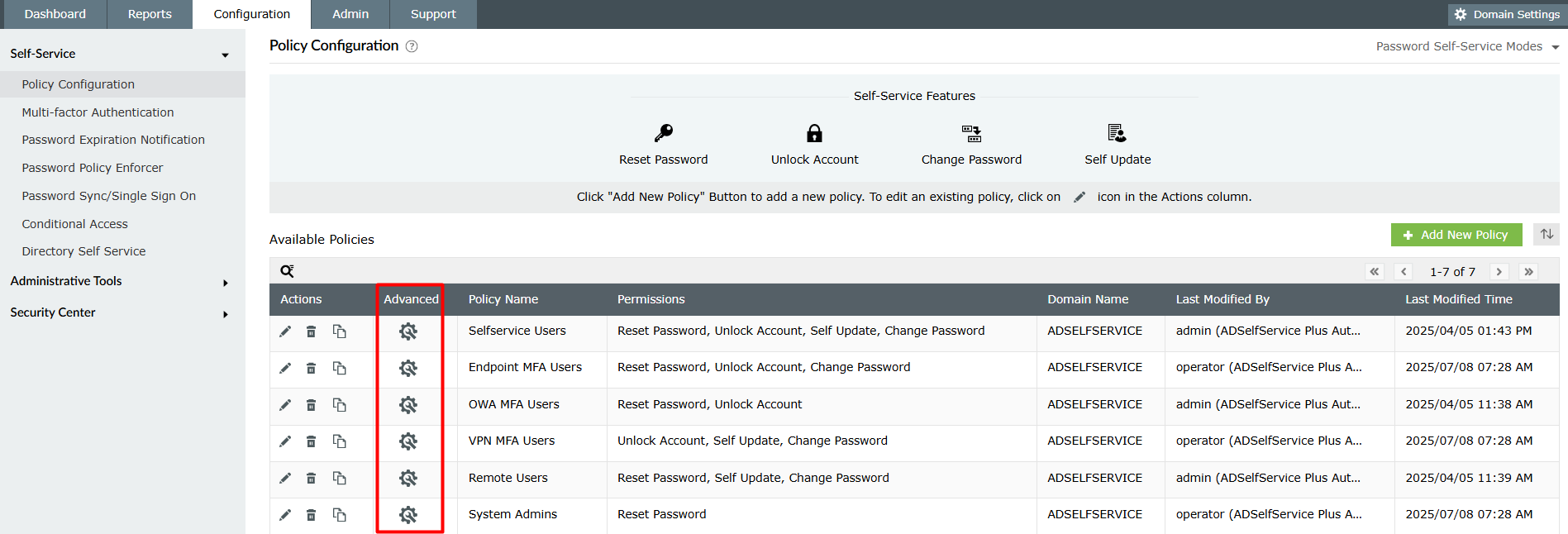
Go to Configuration → Policy Configuration
Select the relevant policy or create a new policy.
2. Activating Automation Settings
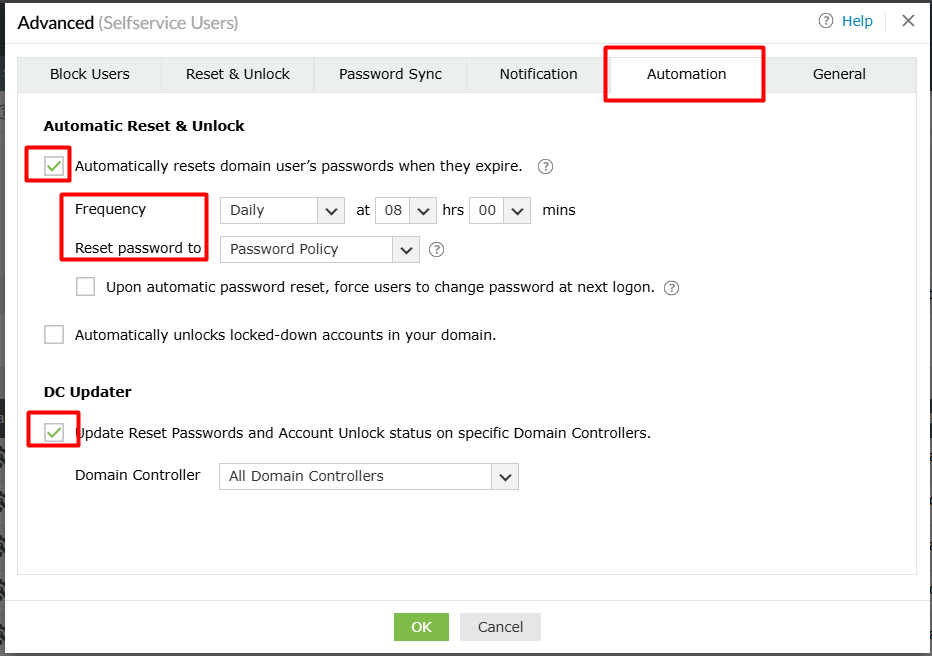
Under the selected policy, go to the Advanced → Automation tab.
Activate the following setting:
"Automatically resets domain user's passwords when they expire"
3. Determining Working Hours
Set when the automation will run using the Frequency setting.
Example: Daily, hourly, or specific time intervals
4. Establishing a Password Policy
Use the Password Policy option to define the criteria for the password to be created.
⚠️ For this step to work:
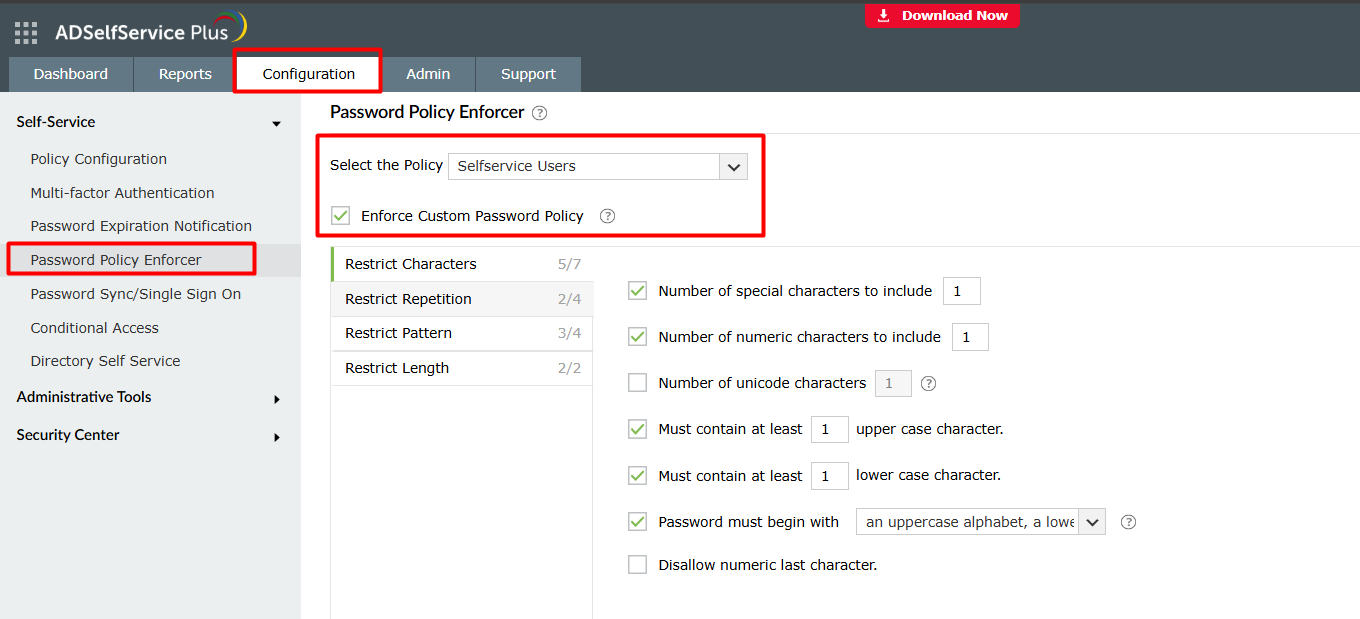
Under Configuration → Password Policy Enforcer, the ADSelfService Plus password policy must be activated.
5. Activating DC Updater
The DC Updater feature must be enabled for changes to be applied to the Domain Controller.
6. SMS Notification Settings
Go to the Notifications tab under the same policy.
Open the Reset Password section.
Activate the "Notify via SMS" option.
7. Customizing SMS Content
Edit the SMS message to be sent to the user.
The following macro must be included in the message:
%password%
📌 This macro ensures that the new password generated by the system is sent to the user.
✅ Result
With this configuration:
- Expired user passwords are automatically reset.
- The automation works within the specified time interval.
- The newly generated password will be sent to the user via SMS.
This way, password management is centralized and automated, eliminating the need for users to perform manual actions.
💡 Notes and Tips
- Test that the gateway integration for sending SMS messages is working correctly.
- From a security standpoint, SMS content and password policy should be carefully defined.
- For critical accounts (e.g., admin accounts), this automation can be managed with a separate policy.
Related Articles
SDP & Jira Integration Document: Technical Installation Guide
SDP → Jira Cloud Integration Setup Guide Contents ? Overview 1. Overview & Architecture 2. Network / Firewall 3. Jira Preparation 3.1 API Token 3.2 Base64 String 3.3 Finding Field ID 3.4 Postman Test 4. Callback Function 4.1 Creation 4.2 Deluge ...Servicedesk Plus - Changing Local Account Password Using Script
Reset Local Authentication Password You can follow the steps below to activate local authentication when logging into the SDP portal or to easily change the password of accounts used with local authentication. How can you change the password of your ...Dell BIOS Password Autoset Script - Easy Management
This script will automatically set Dell BIOS passwords with the given arguments. Script Name : Manage-DellBiosPasswords.ps1 Script Type : ps1 Category : BIOS Platform : Windows Extract the file from the attached zip and run it via Endpoint You can ...ServiceDesk Plus - Request ID Reset and Start from a Specific Value Guide
There may be some scenarios where, after testing Servicedesk Plus and then going live or in long-term SDP usage, the Request ID number is requested to start from 1 again while preserving the configurations. In these scenarios, it is possible to reset ...Password Manager Pro – Reporting of Manually Created Users and Last Login Dates
? Request Summary A list of users created manually (Add Manually) under the Users menu in Password Manager Pro (PMP) is needed. This list, in particular: Clearly distinguishes between manually generated users. Includes the user's last logon date. It ...