ADManager Plus – Bulk Modification/Adding of Secondary Email Addresses
📄 Purpose
Changing the secondary email addresses (proxy addresses) of a large number of users in bulk.
📋 Steps (Exchange Tasks - Modify SMTP Address)
- Click the Management tab.
- Under User Management → Exchange Tasks, select Modify SMTP Address.
- Select the appropriate option: Mailbox Enabled Users or Mail Enabled Users.
- In the Proxy Address section, click the + (Add) icon and select SMTP as the email address type.
- In the Additional Email Address section, enter the secondary email address in your desired format. Example:
smtp:%username%@wotech.com.tr
This format creates a secondary email address in addition to the user's primary email address.
Important Note: (Uppercase SMTP: primary, lowercase SMTP: secondary.) - Select the Domain and OU (Organizational Unit).
- There are three different ways to select the users whose SMTP addresses will be changed:
-Enter usernames, separated by commas, into the text box and use Search to search.
-Leave the field blank and click Search to list all users under the domain and OU you selected.
- Uploading the user list by importing a CSV file. - After selecting the users, click the Apply button.
⚙️ Notes
For secondary addresses, the smtp: prefix should be written in lowercase (this is how it's added as a proxy address).
For the primary email address, SMTP: uppercase letters are used.
📋 Report
To get a report on users whose proxy addresses have been added:
Reports -> Custom Reports -> New Custom Reports
The verification can be done by adding the "added SMTP address" as a criterion under "Proxy Addresses Contains".
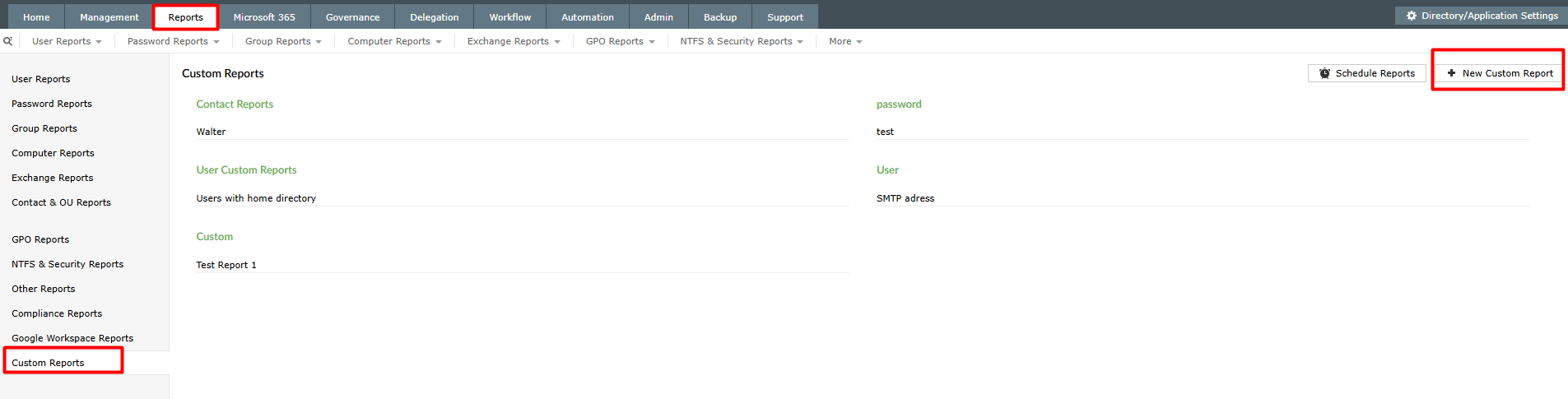
Reports -> Custom Reports -> New Custom Reports
The verification can be done by adding the "added SMTP address" as a criterion under "Proxy Addresses Contains".
Related Articles
OAuth Mail Configuration
Configuring ServiceDesk Plus OAuthentication Microsoft has announced that it will begin disabling Basic Auth for Outlook, EWS, POP, IMAP, EAS, and RPS protocols in Exchange Online starting October 1, 2022. As an alternative, we have prepared a guide ...ServiceDesk Plus – Issue and Solution: Icons Not Showing in the Mail Editor
Problem Description In ServiceDesk Plus, square boxes appear instead of icons for text styles, fonts, bold, italics, and image insertion in the mail editor screen. This occurs because the inline image (icon) files in the application are missing or ...Skipping the Backup Process During Endpoint Central Update (Speeding Up the Update)
During an Endpoint Central update, the system performs a database backup by default. This process can extend the update time, especially in large environments. If a server snapshot is taken before the update, an additional backup may not be ...ADAudit Plus – Alerts and Alert Profiles Guide
What is ADAudit Plus? ADAudit Plus is a software used specifically for monitoring and securing Active Directory (AD) environments. This software monitors, audits, and reports on Active Directory and Windows Server-based systems. In short, ADAudit ...SDP & Jira Integration Document: Technical Installation Guide
SDP → Jira Cloud Integration Setup Guide Contents ? Overview 1. Overview & Architecture 2. Network / Firewall 3. Jira Preparation 3.1 API Token 3.2 Base64 String 3.3 Finding Field ID 3.4 Postman Test 4. Callback Function 4.1 Creation 4.2 Deluge ...